Image Normalization Bug In My Cell Classifier
Recently, I have been working on a computer vision project that counts red blood cells and macrophages in microscope images. The goal is to calculate how many red blood cells each macrophage has eaten, which researchers currently have to count by hand.
I expected the difficult bugs to come from the model but it came from the Extract-Transform-Load process instead.
My initial approach (percentile normalization)
The microscope saves 16-bit images, but the rest of my pipeline works with normal 8-bit images. To convert between them, I used percentile normalization:
low, high = np.percentile(image, [1, 99])
image = np.clip((image - low) / (high - low), 0, 1) * 255
This maps the darkest 1% of pixels to black and the brightest 1% to white. It usually gives an image with nice contrast and prevents a few extreme pixels from controlling the whole range. It looked completely reasonable to me.
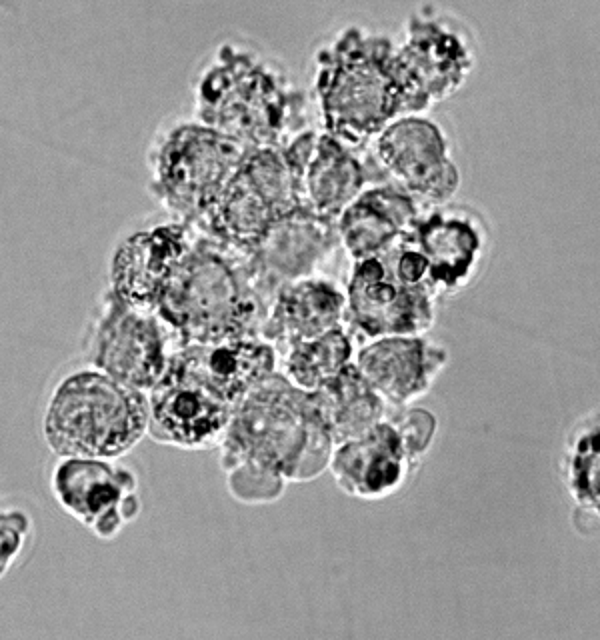
Percentile normalization. The image looks sharp, but many dark regions have been flattened to pure black.
The problem is that red blood cells are the exact things that were clipped to pure black in this image. More than 1% of the pixels were darker than them, so my calculated black point landed above the pixel values for the RBC, resulting in loss of information at those points.
To me (at the time), the image still looked good, but to the CV model, it couldn’t differentiate between black noise spots and the actual RBCs. Becaue of this, it gave out random results that I couldn’t explain until I realized what I had done with the image.
Fixed approach (background normalization)
I fixed it by using the background as the reference point for my normalization. Most of each microscope image is empty background, so its median pixel is a good estimate of how bright that background is. I scale the image until this median always lands at the same gray value:
background = np.median(image)
image = np.clip(image * (157 / background), 0, 255)
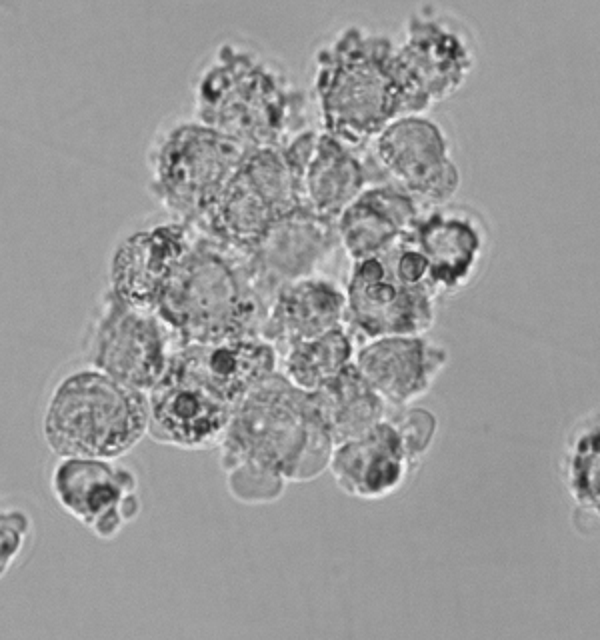
Background normalization. It looks softer, and the model has the pixel information for RBCs
Now the background is consistent between images without forcing the darkest cells to become black. A dark pixel also means roughly the same thing in every field (it belongs to an RBC), which is very useful for the model to make the correlation.
What I learned
As with most of my projects, the most annoying bug did not come from the main feature of my project (the CV model), but from something very trivial.
The problem is that the broken version looked better to my eyes because it had stronger contrast. This project taught me that what the programmer sees is sometimes very different from what the computer sees, which is exactly the same thing I learned when making my Captcha bypass, where I could not see inside the Docker Container to figure out the Captchas were being duplicated and could not be targetted.